

Use the API reference
Screenshots, terminal commands and a verified request workflow.
Use the same steps for link queries, folders, domains, targeting and statistics. Screenshots show a demonstration workspace; replace every example ID and URL with your own.
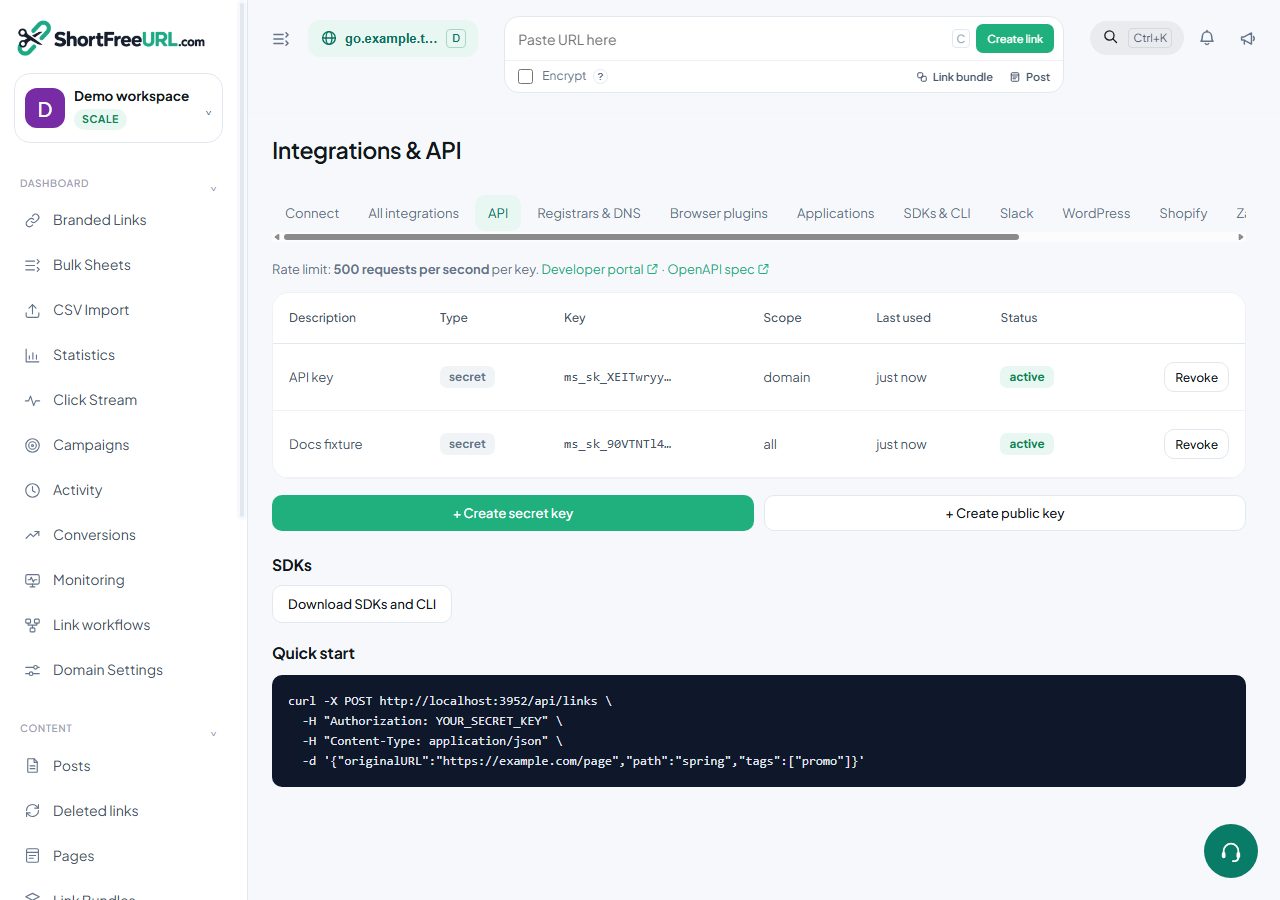
1. Prepare your API key
Open Dashboard → Integrations & API → API. Create a named read-only key for reports or a scoped write key for changes. Keep the secret private.
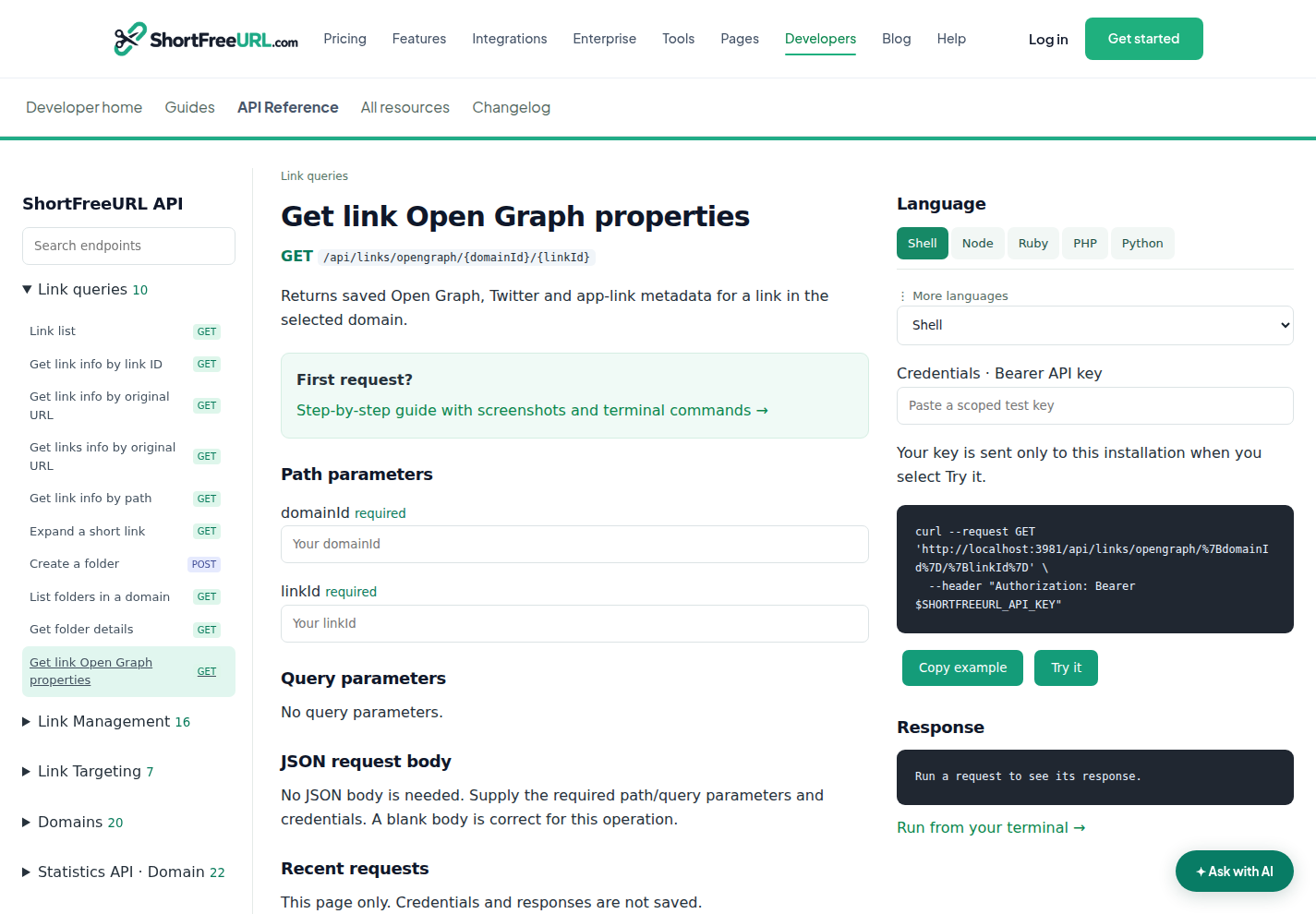
2. Choose an endpoint
Open API reference. Expand Link queries, Link Management, Link Targeting, Domains or Statistics API in the left sidebar. Search by name or path. Select the operation to open its own page.
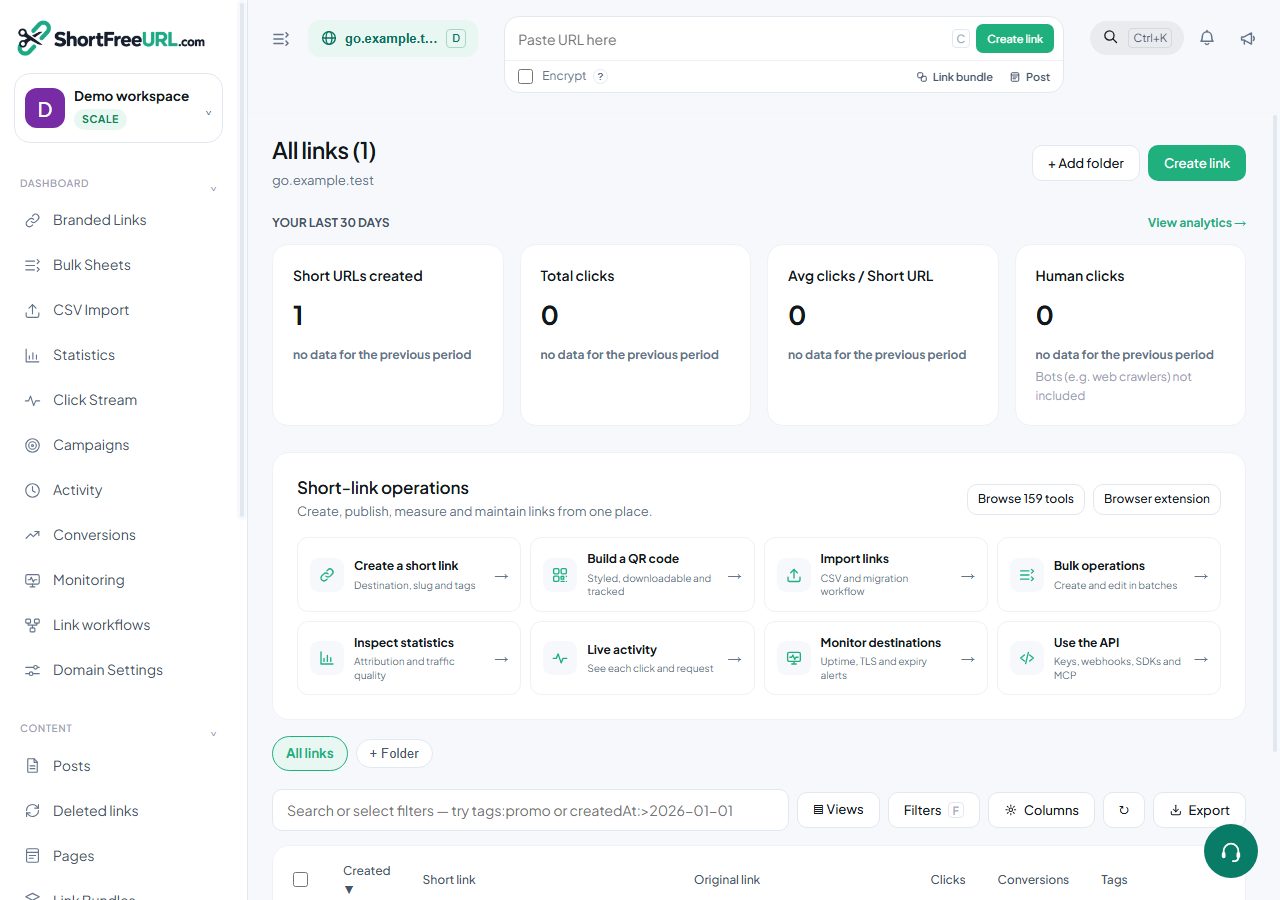
3. Find IDs and fill parameters
Get domain IDs from GET /api/domains, then link IDs from GET /api/links?domainId=YOUR_ID. The link editor URL also contains id=. For folders, list the domain’s folders first.
Path parameters are required. Query parameters filter a read. POST reports accept JSON such as {"period":"last30","column":"country","limit":10}. Reports use UTC. Custom dates need both startDate and endDate.
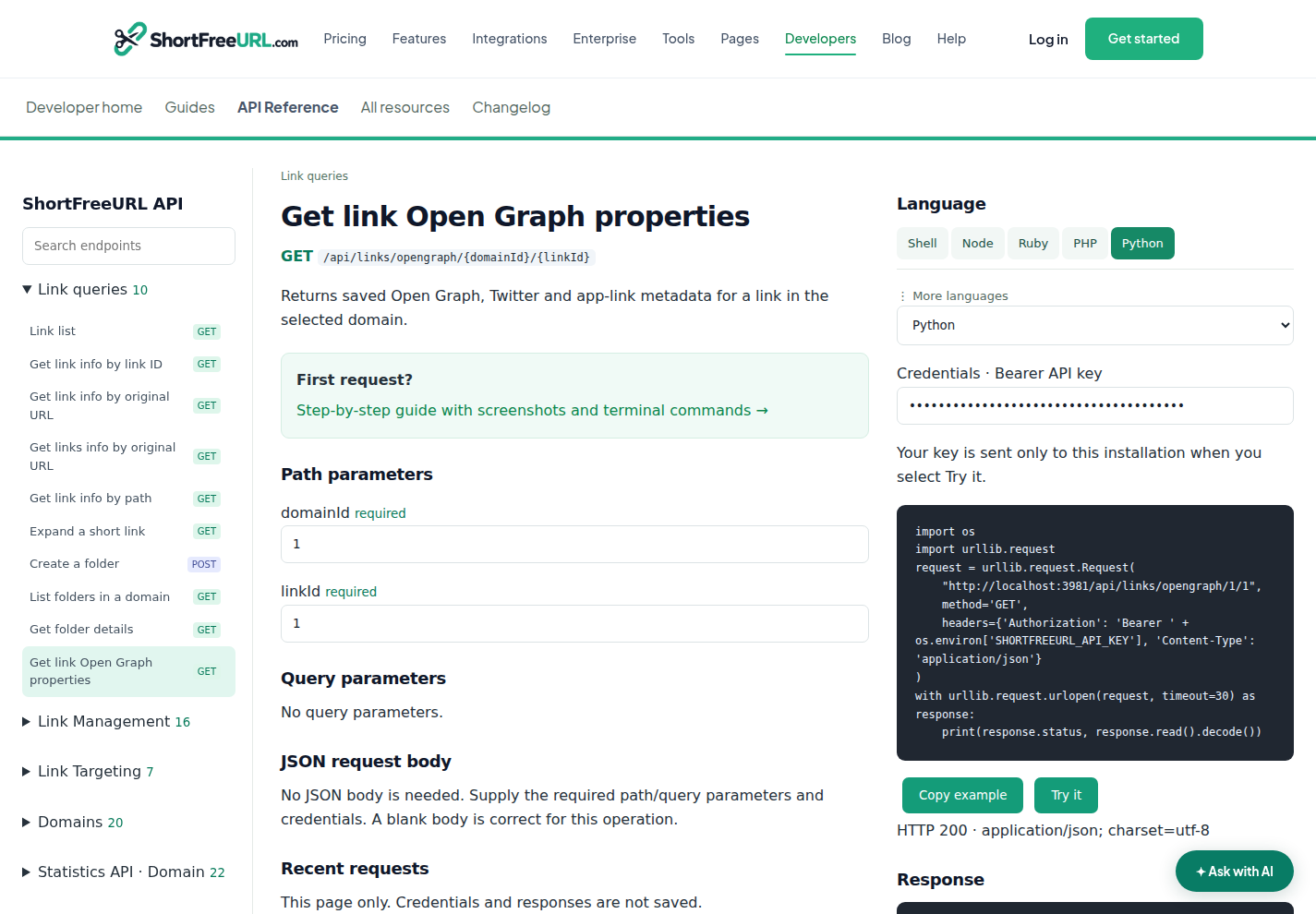
4. Run and inspect a request
- Select Shell, Node, Ruby, PHP or Python, or choose from More languages.
- Review the generated URL and JSON. Enter a scoped test key in Credentials.
- Select Try it. Read the actual status and response. Changes also require the confirmation checkbox.
- Use Cancel request if needed. After cancelling or timing out a write, read the resource before retrying.
5. Run from a terminal
Install curl or use curl.exe on Windows. Set your deployment’s base URL and key for this terminal session. These placeholders are examples.
Windows PowerShell
$env:SHORTFREEURL_BASE_URL = "https://YOUR-WEBSITE"
$secret = Read-Host "API key" -AsSecureString
$env:SHORTFREEURL_API_KEY = [System.Net.NetworkCredential]::new("", $secret).Password
curl.exe --fail-with-body -i "$env:SHORTFREEURL_BASE_URL/api/domains" -H "Authorization: Bearer $env:SHORTFREEURL_API_KEY"
macOS / Linux (Bash)
export SHORTFREEURL_BASE_URL="https://YOUR-WEBSITE"
read -rsp "API key: " SHORTFREEURL_API_KEY; echo
export SHORTFREEURL_API_KEY
curl --fail-with-body -i "$SHORTFREEURL_BASE_URL/api/domains" -H "Authorization: Bearer $SHORTFREEURL_API_KEY"
Copy the selected endpoint’s example after filling your IDs. Python uses its standard library; Node uses fetch. The language examples identify additional libraries where needed. At the end, clear the variable with Remove-Item Env:SHORTFREEURL_API_KEY (PowerShell) or unset SHORTFREEURL_API_KEY (Bash).
Save and run the example
Select a language in the reference, fill in your IDs, then choose Copy example. Save that text in the file below. Run the command in the same terminal where you set your key.
| Language | Requirements | File and command |
|---|---|---|
| Shell | Bash and curl | request.sh → bash request.sh |
| Node | Node.js 18 or newer | request.mjs → node request.mjs |
| Python | Python 3; no extra package | request.py → python request.py |
| Ruby | Ruby with net/http | request.rb → ruby request.rb |
| PHP | PHP with the cURL extension | request.php → php request.php |
| PowerShell | Windows PowerShell or PowerShell 7 | Paste the PowerShell example directly into the terminal. |
The expected result is an HTTP success status and your resource/report. If Python is installed as python3 on your machine, use python3 request.py.
6. Read a statistics report
Use your own domain ID instead of 42. This POST reads a report and works with a read-only key. Dimension include/exclude filters require an eligible plan.
curl --request POST 'https://api.shortfreeurl.com/statistics/domain/42/top_by_interval' \
  --header "Authorization: Bearer $SHORTFREEURL_API_KEY" \
  --header 'Content-Type: application/json' \
  --data-raw '{
  "period": "last30",
  "column": "country",
  "interval": "day",
  "limit": 10
}'
const response = await fetch("https://api.shortfreeurl.com/statistics/domain/42/top_by_interval", {
method: 'POST',
headers: { Authorization: 'Bearer ' + process.env.SHORTFREEURL_API_KEY, 'Content-Type': 'application/json' },
body: "{\n \"period\": \"last30\",\n \"column\": \"country\",\n \"interval\": \"day\",\n \"limit\": 10\n}"
});
const text = await response.text();
// Key, token and webhook responses carry secrets: redact before logging.
console.log(response.status, text.replace(/"(key|apiKey|secret|signingSecret|token|accessToken|refreshToken|password)"\s*:\s*"[^"]*"/gi, '"$1":"[redacted]"'));require 'net/http'
require 'uri'
uri = URI('https://api.shortfreeurl.com/statistics/domain/42/top_by_interval')
request = Net::HTTP::Post.new(uri)
request['Authorization'] = 'Bearer ' + ENV.fetch('SHORTFREEURL_API_KEY')
request['Content-Type'] = 'application/json'
request.body = '{
"period": "last30",
"column": "country",
"interval": "day",
"limit": 10
}'
response = Net::HTTP.start(uri.hostname, uri.port, use_ssl: uri.scheme == 'https') { |http| http.request(request) }
# Key, token and webhook responses carry secrets: redact before logging.
puts response.code, response.body.to_s.gsub(/"(key|apiKey|secret|signingSecret|token|accessToken|refreshToken|password)"\s*:\s*"[^"]*"/i, '"\1":"[redacted]"')<?php
$ch = curl_init('https://api.shortfreeurl.com/statistics/domain/42/top_by_interval');
curl_setopt_array($ch, [
CURLOPT_CUSTOMREQUEST => 'POST',
CURLOPT_RETURNTRANSFER => true,
CURLOPT_HTTPHEADER => ['Authorization: Bearer '.getenv('SHORTFREEURL_API_KEY'), 'Content-Type: application/json'],
CURLOPT_POSTFIELDS => '{
"period": "last30",
"column": "country",
"interval": "day",
"limit": 10
}'
]);
$body = (string) curl_exec($ch);
$status = curl_getinfo($ch, CURLINFO_RESPONSE_CODE);
curl_close($ch);
// Key, token and webhook responses carry secrets: redact before logging.
echo $status, "\n", preg_replace('/"(key|apiKey|secret|signingSecret|token|accessToken|refreshToken|password)"\s*:\s*"[^"]*"/i', '"$1":"[redacted]"', $body), "\n";import os
import re
import urllib.request
request = urllib.request.Request(
"https://api.shortfreeurl.com/statistics/domain/42/top_by_interval",
method='POST',
headers={'Authorization': 'Bearer ' + os.environ['SHORTFREEURL_API_KEY'], 'Content-Type': 'application/json'},
data="{\n \"period\": \"last30\",\n \"column\": \"country\",\n \"interval\": \"day\",\n \"limit\": 10\n}".encode('utf-8')
)
with urllib.request.urlopen(request, timeout=30) as response:
text = response.read().decode()
# Key, token and webhook responses carry secrets: redact before logging.
print(response.status, re.sub(r'"(key|apiKey|secret|signingSecret|token|accessToken|refreshToken|password)"\s*:\s*"[^"]*"', r'"\1":"[redacted]"', text, flags=re.I))#include <stdio.h>
#include <stdlib.h>
#include <string.h>
#include <ctype.h>
#include <curl/curl.h>
struct buf { char *p; size_t n; };
static size_t collect(char *d, size_t s, size_t m, void *u) {
struct buf *b=(struct buf *)u; size_t k=s*m; char *q=(char *)realloc(b->p,b->n+k+1); if(!q)return 0;
b->p=q; memcpy(b->p+b->n,d,k); b->n+=k; b->p[b->n]=0; return k;
}
static int same(const char *a, const char *b, size_t l) { for(size_t i=0;i<l;i++) if(tolower((unsigned char)a[i])!=tolower((unsigned char)b[i])) return 0; return 1; }
/* Key, token and webhook responses carry secrets: redact before logging. */
static void print_redacted(const char *s) {
static const char *names[]={"key","apiKey","secret","signingSecret","token","accessToken","refreshToken","password"};
while(*s) {
int hit=0;
for(size_t i=0;*s=='"'&&!hit&&i<sizeof(names)/sizeof(*names);i++) {
size_t l=strlen(names[i]); const char *v=s+1+l;
if(!same(s+1,names[i],l)||*v!='"') continue;
for(v++;isspace((unsigned char)*v);v++);
if(*v++!=':') continue;
while(isspace((unsigned char)*v)) v++;
if(*v++!='"') continue;
while(*v&&*v!='"') v++;
if(*v!='"') continue;
printf("\"%.*s\":\"[redacted]\"",(int)l,s+1); s=v+1; hit=1;
}
if(!hit) putchar(*s++);
}
putchar('\n');
}
int main(void) {
const char *key=getenv("SHORTFREEURL_API_KEY"); if(!key)return 1;
CURL *c=curl_easy_init(); if(!c)return 1;
char auth[8192]; snprintf(auth,sizeof(auth),"Authorization: Bearer %s",key);
struct curl_slist *h=NULL; h=curl_slist_append(h,auth); h=curl_slist_append(h,"Content-Type: application/json");
struct buf body={NULL,0};
curl_easy_setopt(c,CURLOPT_URL,"https://api.shortfreeurl.com/statistics/domain/42/top_by_interval");
curl_easy_setopt(c,CURLOPT_CUSTOMREQUEST,"POST");
curl_easy_setopt(c,CURLOPT_HTTPHEADER,h);
curl_easy_setopt(c,CURLOPT_TIMEOUT,30L);
curl_easy_setopt(c,CURLOPT_WRITEFUNCTION,collect);
curl_easy_setopt(c,CURLOPT_WRITEDATA,(void *)&body);
curl_easy_setopt(c,CURLOPT_POSTFIELDS,"{\"period\":\"last30\",\"column\":\"country\",\"interval\":\"day\",\"limit\":10}");
CURLcode result=curl_easy_perform(c);
long status=0; curl_easy_getinfo(c,CURLINFO_RESPONSE_CODE,&status);
printf("%ld\n",status); if(body.p) print_redacted(body.p);
free(body.p); curl_slist_free_all(h); curl_easy_cleanup(c); return result==CURLE_OK?0:1;
}using System;
using System.Net.Http;
using System.Text;
using System.Text.RegularExpressions;
using var client=new HttpClient { Timeout=TimeSpan.FromSeconds(30) };
using var request=new HttpRequestMessage(new HttpMethod("POST"), "https://api.shortfreeurl.com/statistics/domain/42/top_by_interval");
request.Headers.Authorization=new System.Net.Http.Headers.AuthenticationHeaderValue("Bearer", Environment.GetEnvironmentVariable("SHORTFREEURL_API_KEY"));
request.Content=new StringContent("{\"period\":\"last30\",\"column\":\"country\",\"interval\":\"day\",\"limit\":10}",Encoding.UTF8,"application/json");
using var response=await client.SendAsync(request);
Console.WriteLine((int)response.StatusCode);
// Key, token and webhook responses carry secrets: redact before logging.
var text=await response.Content.ReadAsStringAsync();
Console.WriteLine(Regex.Replace(text, "\"(key|apiKey|secret|signingSecret|token|accessToken|refreshToken|password)\"\\s*:\\s*\"[^\"]*\"", "\"$1\":\"[redacted]\"", RegexOptions.IgnoreCase));#include <cstdio>
#include <cstdlib>
#include <cstring>
#include <cctype>
#include <curl/curl.h>
struct buf { char *p; size_t n; };
static size_t collect(char *d, size_t s, size_t m, void *u) {
struct buf *b=(struct buf *)u; size_t k=s*m; char *q=(char *)realloc(b->p,b->n+k+1); if(!q)return 0;
b->p=q; memcpy(b->p+b->n,d,k); b->n+=k; b->p[b->n]=0; return k;
}
static int same(const char *a, const char *b, size_t l) { for(size_t i=0;i<l;i++) if(tolower((unsigned char)a[i])!=tolower((unsigned char)b[i])) return 0; return 1; }
/* Key, token and webhook responses carry secrets: redact before logging. */
static void print_redacted(const char *s) {
static const char *names[]={"key","apiKey","secret","signingSecret","token","accessToken","refreshToken","password"};
while(*s) {
int hit=0;
for(size_t i=0;*s=='"'&&!hit&&i<sizeof(names)/sizeof(*names);i++) {
size_t l=strlen(names[i]); const char *v=s+1+l;
if(!same(s+1,names[i],l)||*v!='"') continue;
for(v++;isspace((unsigned char)*v);v++);
if(*v++!=':') continue;
while(isspace((unsigned char)*v)) v++;
if(*v++!='"') continue;
while(*v&&*v!='"') v++;
if(*v!='"') continue;
printf("\"%.*s\":\"[redacted]\"",(int)l,s+1); s=v+1; hit=1;
}
if(!hit) putchar(*s++);
}
putchar('\n');
}
int main(void) {
const char *key=getenv("SHORTFREEURL_API_KEY"); if(!key)return 1;
CURL *c=curl_easy_init(); if(!c)return 1;
char auth[8192]; snprintf(auth,sizeof(auth),"Authorization: Bearer %s",key);
struct curl_slist *h=NULL; h=curl_slist_append(h,auth); h=curl_slist_append(h,"Content-Type: application/json");
struct buf body={NULL,0};
curl_easy_setopt(c,CURLOPT_URL,"https://api.shortfreeurl.com/statistics/domain/42/top_by_interval");
curl_easy_setopt(c,CURLOPT_CUSTOMREQUEST,"POST");
curl_easy_setopt(c,CURLOPT_HTTPHEADER,h);
curl_easy_setopt(c,CURLOPT_TIMEOUT,30L);
curl_easy_setopt(c,CURLOPT_WRITEFUNCTION,collect);
curl_easy_setopt(c,CURLOPT_WRITEDATA,(void *)&body);
curl_easy_setopt(c,CURLOPT_POSTFIELDS,"{\"period\":\"last30\",\"column\":\"country\",\"interval\":\"day\",\"limit\":10}");
CURLcode result=curl_easy_perform(c);
long status=0; curl_easy_getinfo(c,CURLINFO_RESPONSE_CODE,&status);
printf("%ld\n",status); if(body.p) print_redacted(body.p);
free(body.p); curl_slist_free_all(h); curl_easy_cleanup(c); return result==CURLE_OK?0:1;
};; deps.edn: {:deps {clj-http/clj-http {:mvn/version "3.13.0"}}}
(require '[clj-http.client :as http])
(def response (http/request {:method :post
:url "https://api.shortfreeurl.com/statistics/domain/42/top_by_interval"
:headers {"Authorization" (str "Bearer " (System/getenv "SHORTFREEURL_API_KEY")) "Content-Type" "application/json"}
:socket-timeout 30000 :connection-timeout 30000 :throw-exceptions false
:body "{\"period\":\"last30\",\"column\":\"country\",\"interval\":\"day\",\"limit\":10}"}))
;; Key, token and webhook responses carry secrets: redact before logging.
(println (:status response) (clojure.string/replace (str (:body response)) #"(?i)\"(key|apiKey|secret|signingSecret|token|accessToken|refreshToken|password)\"\s*:\s*\"[^\"]*\"" "\"$1\":\"[redacted]\""))require "http/client"
uri=URI.parse("https://api.shortfreeurl.com/statistics/domain/42/top_by_interval")
headers=HTTP::Headers{"Authorization" => "Bearer " + ENV["SHORTFREEURL_API_KEY"], "Content-Type" => "application/json"}
client=HTTP::Client.new(uri)
client.read_timeout=30.seconds
response=client.exec("POST", uri.request_target, headers, "{\"period\":\"last30\",\"column\":\"country\",\"interval\":\"day\",\"limit\":10}")
puts response.status_code
# Key, token and webhook responses carry secrets: redact before logging.
puts response.body.gsub(/"(key|apiKey|secret|signingSecret|token|accessToken|refreshToken|password)"\s*:\s*"[^"]*"/i) { |_, m| %("#{m[1]}":"[redacted]") }
client.closepackage main
import ("fmt"; "io"; "net/http"; "os"; "regexp"; "time"; "strings")
func main() {
req,err:=http.NewRequest("POST","https://api.shortfreeurl.com/statistics/domain/42/top_by_interval",strings.NewReader("{\"period\":\"last30\",\"column\":\"country\",\"interval\":\"day\",\"limit\":10}")); if err!=nil { panic(err) }
req.Header.Set("Authorization","Bearer "+os.Getenv("SHORTFREEURL_API_KEY"))
req.Header.Set("Content-Type","application/json")
client:=&http.Client{Timeout:30*time.Second}
res,err:=client.Do(req); if err!=nil { panic(err) }; defer res.Body.Close()
data,err:=io.ReadAll(res.Body); if err!=nil { panic(err) }
// Key, token and webhook responses carry secrets: redact before logging.
secret:=regexp.MustCompile("(?i)\"(key|apiKey|secret|signingSecret|token|accessToken|refreshToken|password)\"\\s*:\\s*\"[^\"]*\"")
fmt.Println(res.Status,secret.ReplaceAllString(string(data),"\"$1\":\"[redacted]\""))
}POST /statistics/domain/42/top_by_interval HTTP/1.1
Host: api.shortfreeurl.com
Authorization: Bearer <SHORTFREEURL_API_KEY>
Accept: application/json
Content-Type: application/json
{"period":"last30","column":"country","interval":"day","limit":10}import java.net.URI;
import java.net.http.*;
import java.time.Duration;
public class Example {
public static void main(String[] args) throws Exception {
var request=HttpRequest.newBuilder(URI.create("https://api.shortfreeurl.com/statistics/domain/42/top_by_interval")).timeout(Duration.ofSeconds(30))
.header("Authorization","Bearer "+System.getenv("SHORTFREEURL_API_KEY"))
.header("Content-Type","application/json")
.method("POST",HttpRequest.BodyPublishers.ofString("{\"period\":\"last30\",\"column\":\"country\",\"interval\":\"day\",\"limit\":10}")).build();
var response=HttpClient.newHttpClient().send(request,HttpResponse.BodyHandlers.ofString());
System.out.println(response.statusCode());
// Key, token and webhook responses carry secrets: redact before logging.
System.out.println(response.body().replaceAll("(?i)\"(key|apiKey|secret|signingSecret|token|accessToken|refreshToken|password)\"\\s*:\\s*\"[^\"]*\"", "\"$1\":\"[redacted]\""));
}
}{
"method": "POST",
"url": "https://api.shortfreeurl.com/statistics/domain/42/top_by_interval",
"headers": {
"Authorization": "Bearer <SHORTFREEURL_API_KEY>",
"Content-Type": "application/json"
},
"body": {
"period": "last30",
"column": "country",
"interval": "day",
"limit": 10
},
"note": "Request description; use an HTTP client to execute."
}// Kotlin/JVM, JDK 11+. Mobile apps should call your authenticated backend.
import java.net.URI
import java.net.http.*
import java.time.Duration
fun main() {
val request=HttpRequest.newBuilder(URI.create("https://api.shortfreeurl.com/statistics/domain/42/top_by_interval"))
.timeout(Duration.ofSeconds(30))
.header("Authorization", "Bearer " + System.getenv("SHORTFREEURL_API_KEY"))
.header("Content-Type", "application/json")
.method("POST", HttpRequest.BodyPublishers.ofString("{\"period\":\"last30\",\"column\":\"country\",\"interval\":\"day\",\"limit\":10}"))
.build()
val response=HttpClient.newHttpClient().send(request,HttpResponse.BodyHandlers.ofString())
println(response.statusCode())
// Key, token and webhook responses carry secrets: redact before logging.
println(response.body().replace(Regex("\"(key|apiKey|secret|signingSecret|token|accessToken|refreshToken|password)\"\\s*:\\s*\"[^\"]*\"", RegexOption.IGNORE_CASE), "\"\$1\":\"[redacted]\""))
}// Command-line Foundation example; keep secrets out of shipped iOS apps.
#import <Foundation/Foundation.h>
int main(void) { @autoreleasepool {
NSMutableURLRequest *request=[NSMutableURLRequest requestWithURL:[NSURL URLWithString:@"https://api.shortfreeurl.com/statistics/domain/42/top_by_interval"]];
request.HTTPMethod=@"POST"; request.timeoutInterval=30;
NSString *key=NSProcessInfo.processInfo.environment[@"SHORTFREEURL_API_KEY"];
[request setValue:[@"Bearer " stringByAppendingString:key ?: @""] forHTTPHeaderField:@"Authorization"];
[request setValue:@"application/json" forHTTPHeaderField:@"Content-Type"];
request.HTTPBody=[@"{\"period\":\"last30\",\"column\":\"country\",\"interval\":\"day\",\"limit\":10}" dataUsingEncoding:NSUTF8StringEncoding];
dispatch_semaphore_t done=dispatch_semaphore_create(0);
[[[NSURLSession sharedSession] dataTaskWithRequest:request completionHandler:^(NSData *data, NSURLResponse *response, NSError *error) {
NSString *text=[[NSString alloc] initWithData:data ?: [NSData data] encoding:NSUTF8StringEncoding] ?: @"";
// Key, token and webhook responses carry secrets: redact before logging.
NSRegularExpression *secret=[NSRegularExpression regularExpressionWithPattern:@"\"(key|apiKey|secret|signingSecret|token|accessToken|refreshToken|password)\"\\s*:\\s*\"[^\"]*\"" options:NSRegularExpressionCaseInsensitive error:nil];
text=[secret stringByReplacingMatchesInString:text options:0 range:NSMakeRange(0,text.length) withTemplate:@"\"$1\":\"[redacted]\""];
NSLog(@"%ld %@",(long)[(NSHTTPURLResponse *)response statusCode],error ?: text);
dispatch_semaphore_signal(done);
}] resume];
dispatch_semaphore_wait(done, DISPATCH_TIME_FOREVER);
} return 0; }(* opam install cohttp-lwt-unix; link the str library for the redaction *)
open Lwt.Infix
let () = Lwt_main.run (
let headers=Cohttp.Header.of_list [("Authorization","Bearer " ^ Sys.getenv "SHORTFREEURL_API_KEY");("Content-Type","application/json")] in
Cohttp_lwt_unix.Client.call ~headers ~body:(Cohttp_lwt.Body.of_string "{\"period\":\"last30\",\"column\":\"country\",\"interval\":\"day\",\"limit\":10}") `POST (Uri.of_string "https://api.shortfreeurl.com/statistics/domain/42/top_by_interval") >>= fun (response,body) ->
Cohttp_lwt.Body.to_string body >>= fun text ->
(* Key, token and webhook responses carry secrets: redact before logging. *)
let secret=Str.regexp_case_fold "\"\\(key\\|apiKey\\|secret\\|signingSecret\\|token\\|accessToken\\|refreshToken\\|password\\)\"[ \t\r\n]*:[ \t\r\n]*\"[^\"]*\"" in
Printf.printf "%d\n%s\n" (Cohttp.Code.code_of_status (Cohttp.Response.status response)) (Str.global_replace secret "\"\\1\":\"[redacted]\"" text); Lwt.return_unit)$headers=@{Authorization="Bearer $env:SHORTFREEURL_API_KEY"; 'Content-Type'='application/json'}
$response=Invoke-WebRequest -Uri 'https://api.shortfreeurl.com/statistics/domain/42/top_by_interval' -Method POST -Headers $headers -TimeoutSec 30 -Body '{"period":"last30","column":"country","interval":"day","limit":10}'
$response.StatusCode
# Key, token and webhook responses carry secrets: redact before logging.
$response.Content -replace '"(key|apiKey|secret|signingSecret|token|accessToken|refreshToken|password)"\s*:\s*"[^"]*"', '"$1":"[redacted]"'# install.packages("httr2")
library(httr2)
request <- request("https://api.shortfreeurl.com/statistics/domain/42/top_by_interval") |> req_method("POST") |>
req_headers(Authorization=paste("Bearer",Sys.getenv("SHORTFREEURL_API_KEY"))) |> req_timeout(30) |>
req_body_raw("{\"period\":\"last30\",\"column\":\"country\",\"interval\":\"day\",\"limit\":10}", type="application/json")
response <- req_perform(request)
resp_status(response)
# Key, token and webhook responses carry secrets: redact before logging.
cat(gsub('"(key|apiKey|secret|signingSecret|token|accessToken|refreshToken|password)"\\s*:\\s*"[^"]*"', '"\\1":"[redacted]"', resp_body_string(response), ignore.case=TRUE), "\n")// Cargo.toml: reqwest = { version = "0.12", features = ["blocking"] }, regex = "1"
use std::{env,time::Duration};
fn main() -> Result<(), Box<dyn std::error::Error>> {
let client=reqwest::blocking::Client::builder().timeout(Duration::from_secs(30)).build()?;
let response=client.request(reqwest::Method::POST,"https://api.shortfreeurl.com/statistics/domain/42/top_by_interval")
.bearer_auth(env::var("SHORTFREEURL_API_KEY")?)
.header("Content-Type","application/json")
.body("{\"period\":\"last30\",\"column\":\"country\",\"interval\":\"day\",\"limit\":10}").send()?;
println!("{}",response.status());
// Key, token and webhook responses carry secrets: redact before logging.
let secret=regex::Regex::new(r#"(?i)"(key|apiKey|secret|signingSecret|token|accessToken|refreshToken|password)"\s*:\s*"[^"]*""#)?;
println!("{}",secret.replace_all(&response.text()?, r#""${1}":"[redacted]""#)); Ok(())
}// Swift 5.5+ command-line example. Never ship a secret in an iOS binary.
import Foundation
#if canImport(FoundationNetworking)
import FoundationNetworking
#endif
var request=URLRequest(url:URL(string:"https://api.shortfreeurl.com/statistics/domain/42/top_by_interval")!)
request.httpMethod="POST"
request.timeoutInterval=30
request.setValue("Bearer " + (ProcessInfo.processInfo.environment["SHORTFREEURL_API_KEY"] ?? ""),forHTTPHeaderField:"Authorization")
request.setValue("application/json",forHTTPHeaderField:"Content-Type")
request.httpBody="{\"period\":\"last30\",\"column\":\"country\",\"interval\":\"day\",\"limit\":10}".data(using:.utf8)
let (data,response)=try await URLSession.shared.data(for:request)
print((response as? HTTPURLResponse)?.statusCode ?? 0)
// Key, token and webhook responses carry secrets: redact before logging.
print((String(data:data,encoding:.utf8) ?? "").replacingOccurrences(of:#""(key|apiKey|secret|signingSecret|token|accessToken|refreshToken|password)"\s*:\s*"[^"]*""#, with:#""$1":"[redacted]""#, options:[.regularExpression,.caseInsensitive]))// Run on your server. Do not embed a secret key in public browser code.
const response = await fetch("https://api.shortfreeurl.com/statistics/domain/42/top_by_interval", {
method: 'POST',
headers: { Authorization: 'Bearer ' + token, 'Content-Type': 'application/json' },
body: "{\n \"period\": \"last30\",\n \"column\": \"country\",\n \"interval\": \"day\",\n \"limit\": 10\n}"
});
const text = await response.text();
// Key, token and webhook responses carry secrets: redact before logging.
console.log(response.status, text.replace(/"(key|apiKey|secret|signingSecret|token|accessToken|refreshToken|password)"\s*:\s*"[^"]*"/gi, '"$1":"[redacted]"'));Empty reports mean no matching tracked clicks in the retained period. A 401, 402, 403 or 429 is an error, not an empty report. Compare counts using the same domain, filters, period and timezone.
7. Verify and troubleshoot
For changes, reopen the same record in the dashboard and read it through the API. Never retry a payment or a bulk creation blindly. For folder creation, list folders again. For domain settings, read the domain again. Clearing statistics requires an owner/admin, write access and an explicit domain confirmation; it cannot be undone.